

Buying Budget & Used Gaming PCs: Avoiding the pitfalls!
Buying a “budget gaming PC” on eBay, Facebook Marketplace, or other second-hand sites can be a minefield. Every day, listings appear for “powerful gaming PCs” boasting impressive-sounding specs — Intel Core i7, 16GB RAM, GTX graphics, RGB lighting — but behind the flashy case and colourful LEDs often lies a collection of outdated or mismatched components that won’t deliver the performance you expect.
At UntangleIT, we regularly see customers who’ve been caught out by these misleading builds. Here’s what to look out for, what to avoid, and how to make sure your next gaming PC actually meets your needs.
👀An Example…
Let’s say you’re not sure where to start, so you go to google and search for “gaming pc uk” – you immediately see that gaming PCs are expensive!
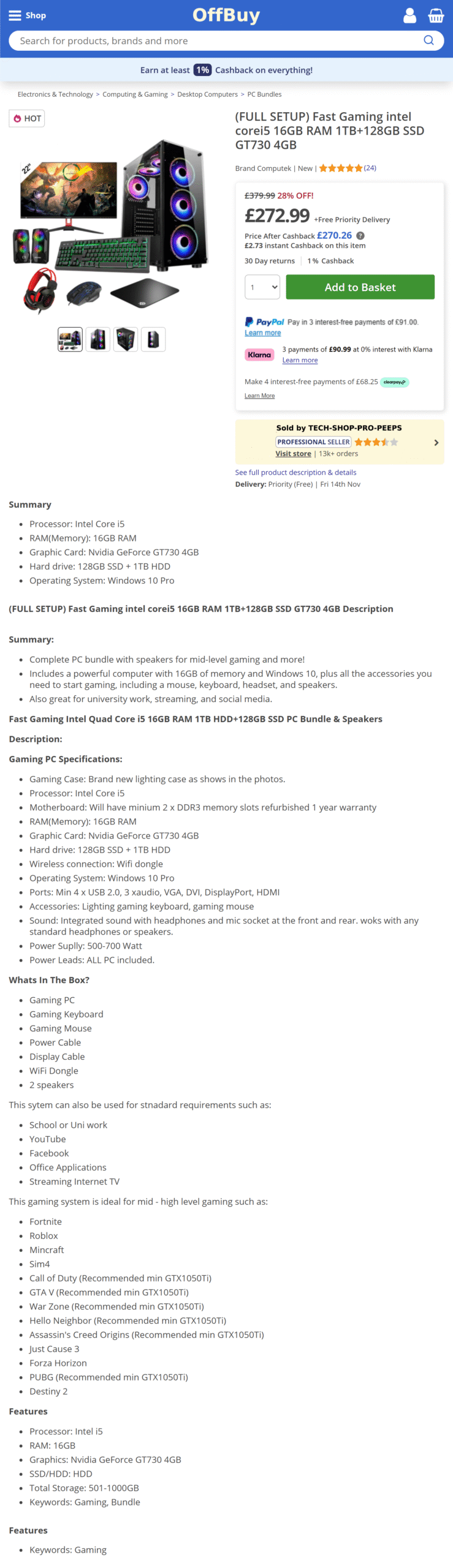
So, you search again, for “budget gaming pc”, aha! A result that’s under £400! Much better, let’s have a look… it could be on eBay, Amazon, or even a swanky custom website, but it’ll be similar to this:
⚠️ The Buzzword Trap – “Fast”, “Gaming, “i7”, “i5”
None of these terms are helpful to us when looking at this product. Firstly, “Fast” is subjective, how fast? Fast at doing what exactly? We can forget that immediately. “Gaming” shows only that they are calling it a gaming PC, usually it is used to describe any computer in a modern looking ‘gaming’ style case.
i5 and i7 you may be aware refer to types of processor made by Intel, they have however been using these model numbers since 2009. Without the full model number there is no way of knowing what performance and specification this PC has.
For example:
An Intel Core i7-920 might sound powerful — it’s an i7, right? However it’s now nearing 17 years old and will be outperformed by even budget modern processors. It is cheap though, ideal if you are maximising profit – you can buy one for 50p from CeX!
The same applies to older AMD CPUs — an FX-series “8-core” chip is far slower than even a modern Ryzen 3. Always check the generation of the CPU (e.g., i7-8700 = 8th Gen, i5-10400 = 10th Gen) and look up benchmarks before buying. If they don’t list the specification, assume the worst!
🧩 Mismatched or Unbalanced Builds
Many sellers build “Frankenstein PCs” from whatever parts they have available cheaply, often from old office computers that have been discarded as eWaste! It’s not unusual to find a system with:
- A relatively decent graphics card paired with an ancient CPU that causes bottleneck
- Cheap, no-name power supply that could fail or even damage components
- A small or slow hard drive instead of an SSD, or if there is an SSD it may be ‘refurbished’ and have an unknown lifespan left.
- RGB fans and a “gamer” case to make it look impressive, while the internals are years behind.
A balanced system is far more important than one that just looks fast.
🧠 Think About What You Want to Play
Before you start shopping, make a list of the games you want to play. Then visit the game’s website or Steam page and look at the Minimum and Recommended System Requirements.
For example:
Fortnite can run on fairly modest hardware.
Cyberpunk 2077 or Starfield need far more powerful GPUs and CPUs to run well.
If your target games list “16GB RAM, RTX 3060, and i5-12400” as recommended, a system with an old i7-4770 and GTX 970 might technically run them — but at much lower settings and frame rates.
🕸 Windows 11 on Unsupported Hardware
Another red flag is when sellers advertise older PCs with Windows 11 already installed.
Microsoft officially requires newer processors and TPM 2.0 support for Windows 11. Older CPUs (especially before 8th Gen Intel or 2nd Gen Ryzen) are not supported. Sellers often force-install Windows 11 using workarounds to make the PC appear newer and more “future-proof” than it is.
The problem? If you need to reinstall Windows in the future you will likely be unable to without access to the modified installation media as used by the seller.
🔍 How to Spot a Good Deal
Here are some tips before you buy:
- Avoid vague or incomplete descriptions and specification.
- Look up individual components to get an idea of value, for example if you search for “Nvidia Geforce GT730 4gb” on the CeX website you can see currently they sell it for £18, and buy it for only £4!
- When looking at bundles, assume the worst in accessories – sellers often ‘overvalue’ the accessories they bundle, they are often the lowest quality, and you would be better off even buying the ‘gaming’ accessories sold cheaply on the high street each christmas!
- Look for modern standards: NVMe SSDs, DDR4 or DDR5 RAM, USB 3.0 ports, and PCIe 3.0 or higher.
- Avoid private sellers – you will have less recourse if it is not as described or goes wrong.
- Ask for guarantees from the seller, if a seller tells you when asked that a system will play a certain game for example, then if it does not you have grounds to return it.
Be wary of “refurbished” systems unless the seller is reputable and offers a warranty. Feedback is important – but many of these sellers have very good feedback as their customers simply do not know what they have bought!
💡 Better Alternatives
If your goal is to get into gaming without breaking the bank, consider:
- Buying a used business desktop (e.g. Dell OptiPlex, HP EliteDesk) and adding a mid-range graphics card — a great way to get solid performance at a low cost. This isn’t always straightforward – so perhaps a family friend or local Computer shop can assist.
- Starting small — an entry-level gaming system that can be upgraded over time is often a smarter investment than an overhyped “gamer PC” full of outdated parts. A modern processor with onboard graphics, ready to add a dedicated card when funds allow!
- or even.. dare we say.. consider buying a games console! The latest Xbox or PlayStation console is usually cheaper than the equivalent performance PC because Microsoft & Sony are happy to make a loss on the hardware, knowing that they will get revenue from your game purchases.
🧰 Final Thoughts..
Cheap, ‘gaming PCs’ as we have featured above have their place as long as you know what you are getting. In fairness to the sellers, although the cost of the components will be fair less than the price you pay, you are presumably paying for aftersales support, the cost of assembly and that could be worth the price you pay.
As long as you bear in mind the limitations –
- Stuck playing older or less graphically intensive games
- Limited/no scope for future upgrades
- Already aging hardware that may be more prone to failure
And if you’re unsure, walk away!
